The Story of a VPN Project
Disclaimer Everything described in this text is a work of fiction. Any resemblance to real events, people, companies, services, technical solutions, or methods of bypassing restrictions is purely coincidental. The material is for entertainment and educational purposes only. The author does not engage in providing means of circumventing blocks, does not provide instructions for creating them, nor encourages their use. The names of services, protocols, and methods are mentioned in the context of general technical knowledge.
I've decided to start a "Project Stories" series, where I'll talk about projects that brought me genuine enjoyment and taught me something new.
The next part will be about Homelab: how this project became a haven for sports pirates from Spain streaming to 2,000 users and anime artists from Argentina, how badly I messed up with access permissions, the first DMCA abuses, and how federated networks introduced me to engineers around the world — from Amazon to Sber.
Background
Hi everyone. On the Internet I go by usr. I'm a computer technology enthusiast.
In this article I want to talk in detail about how one VPN provider works from the inside — for obvious reasons I can't name the service. This is about the approaches and methods we use in practice. Brace yourselves, because it's about to get very dense and boring :D I'll fully satisfy my obsession with diagrams and technical documentation.
In December I was asked to join this project. I had plenty of experience with Private Networks — setting up dozens of OpenVPN and Shadowsocks implementations to bypass restrictions in Turkmenistan and China, working with 3X-UI and its forks — all of that was familiar.

Additionally, this project aligns with my principles of freedom and privacy online. For me, this is a non-commercial project.
Right from the start, the project presented worthy technical challenges: setting up server-side VLESS routing and launching a Telegram bot. I couldn't pass up that kind of experience.
Architecture
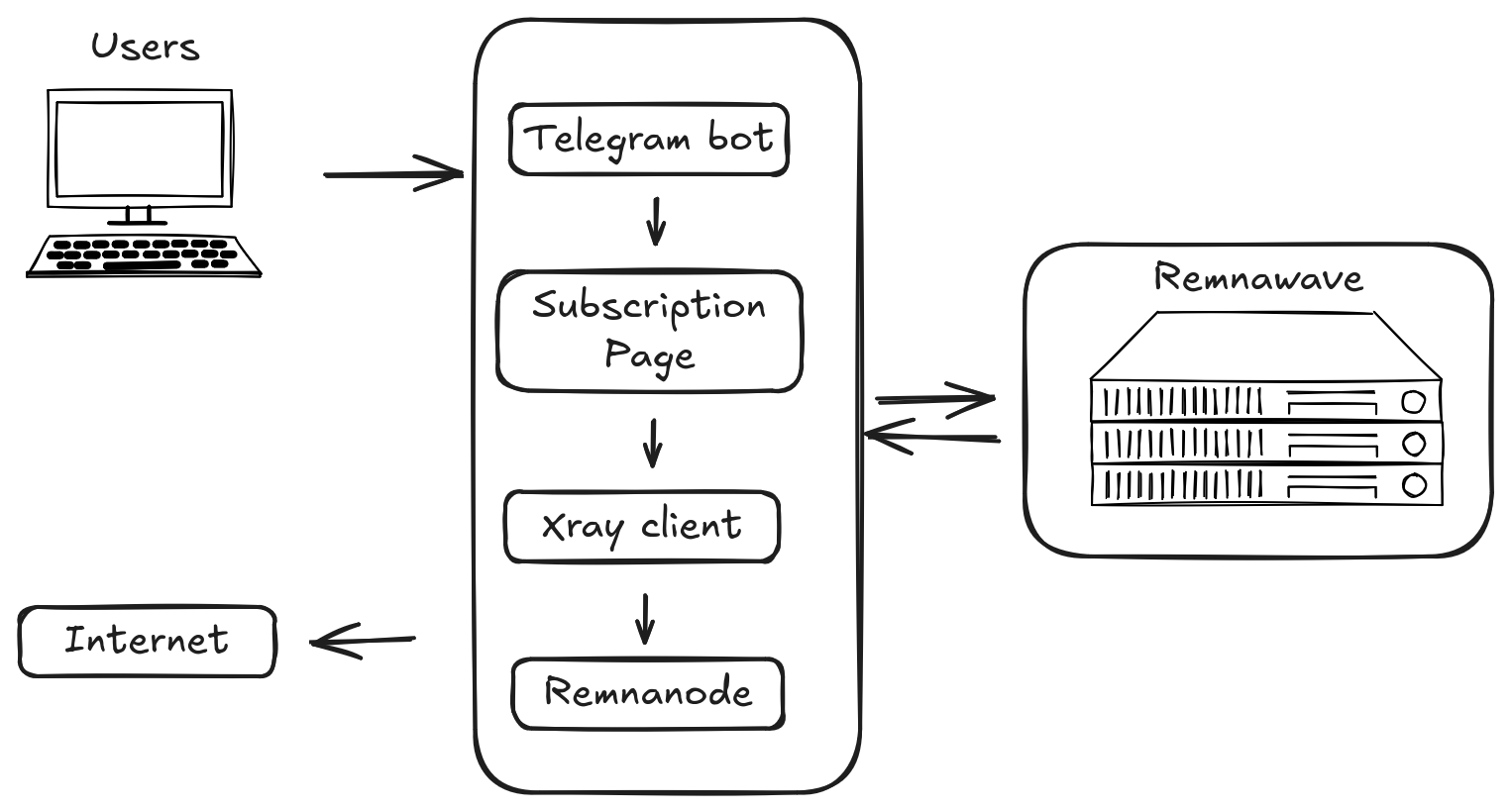
The project is modular and consists of Remnawave — the control panel, Subscription Page, Remnanode — the Remnawave node, and a Telegram bot.
Initially, everything except the nodes fit on a single server with this configuration:
- CPU: 4 cores
- RAM: 8 GB
- Storage: SSD 80 GB
- OS: Debian 12
Later, due to restrictions, the Telegram bot started migrating from server to server, and this process still hasn't stopped. It all started with Telegram's restrictions, then the scandal when we rented a server in Belarus and they refused to renew it, and just a couple of days ago a regional block hit from the cloud provider I'd been working with for about 8 years. I relied heavily on their infrastructure.
In addition to the core infrastructure, there's also a monitoring server located on my home server.
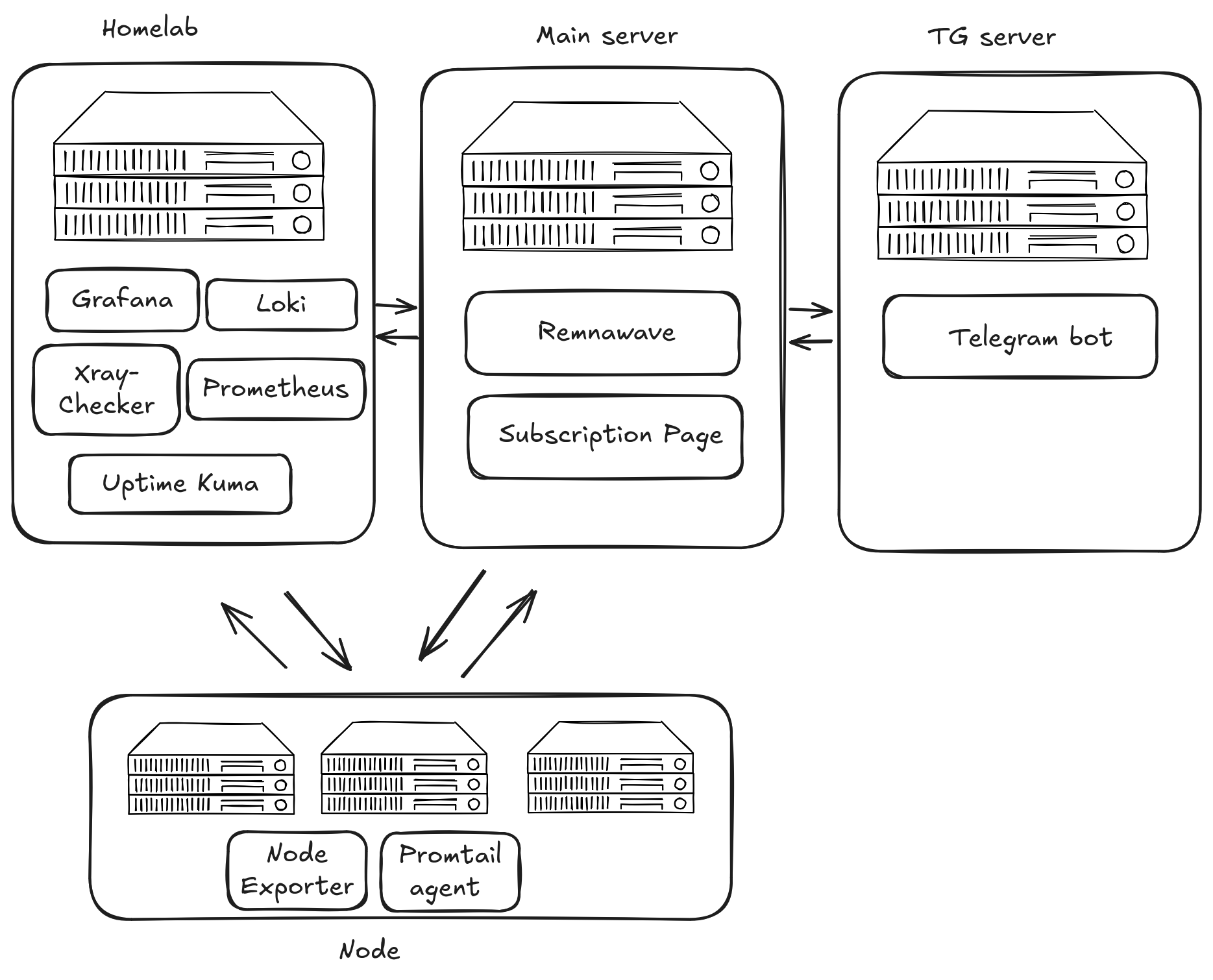
VLESS Architecture
From the very start, implementing server-side routing for VLESS was a requirement.
Alongside this, the self-steal method took root. The advantage of this method is that it's cheaper to rent.
We experimented with different transports like CDN or XHTTP. But they either didn't stand the test of time, as with CDN, or, as with XHTTP, were too hacky in combination with Remnawave.
Self-steal
This method masks Reality traffic as interaction with a decoy website.
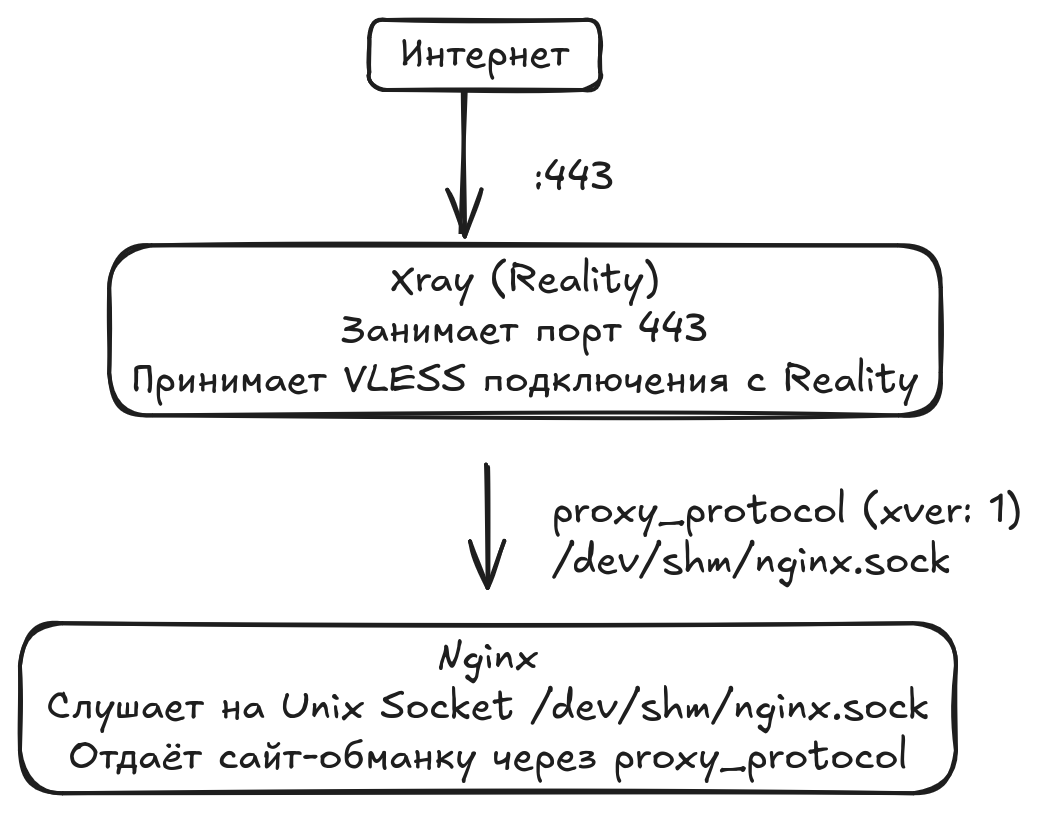
We use Nginx in Unix socket connection mode because of its speed advantage — no TCP stack overhead. And it's safer and simpler because no network port is occupied.
The funny part is that for masking we have to host legitimate-looking meme websites. From the outside it looks like a regular site.
Server-side routing
To route traffic between RU and COM servers, some of our VLESS connections use this scheme:
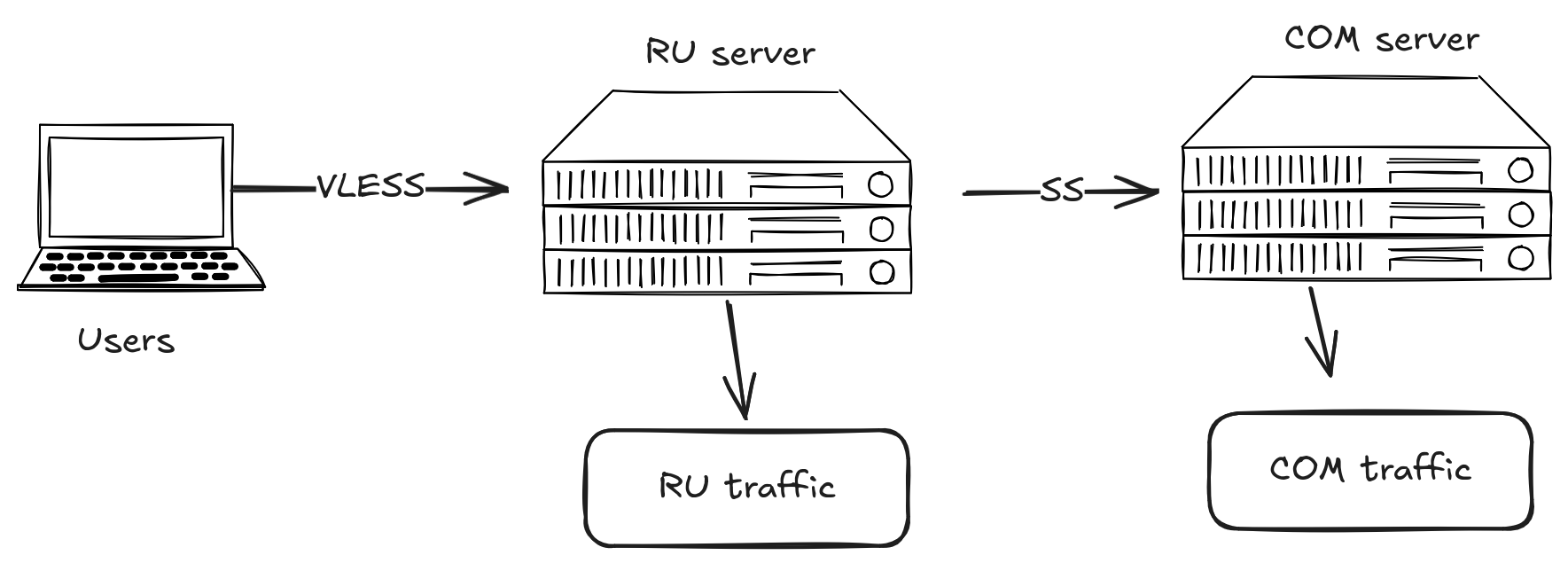
This method is more expensive to maintain due to rental costs, but it solves certain user problems — specifically during the introduction of whitelists, when users with foreign IPs couldn't access Russian resources.
Plus, this method fit well into the scheme with LTE network servers.
The main downside is noticeably higher latency. Although we use the Shadowsocks protocol for inter-server communication, one of the optimal choices for this purpose. But experiments with VLESS-to-VLESS connections are already underway.
User-side routing
Renting servers for the LTE network is very expensive because traffic is billed separately. (I complain about finances way too much). To save traffic for users who use the Happ client (the majority), we added routing rules to the subscription. It works like this:
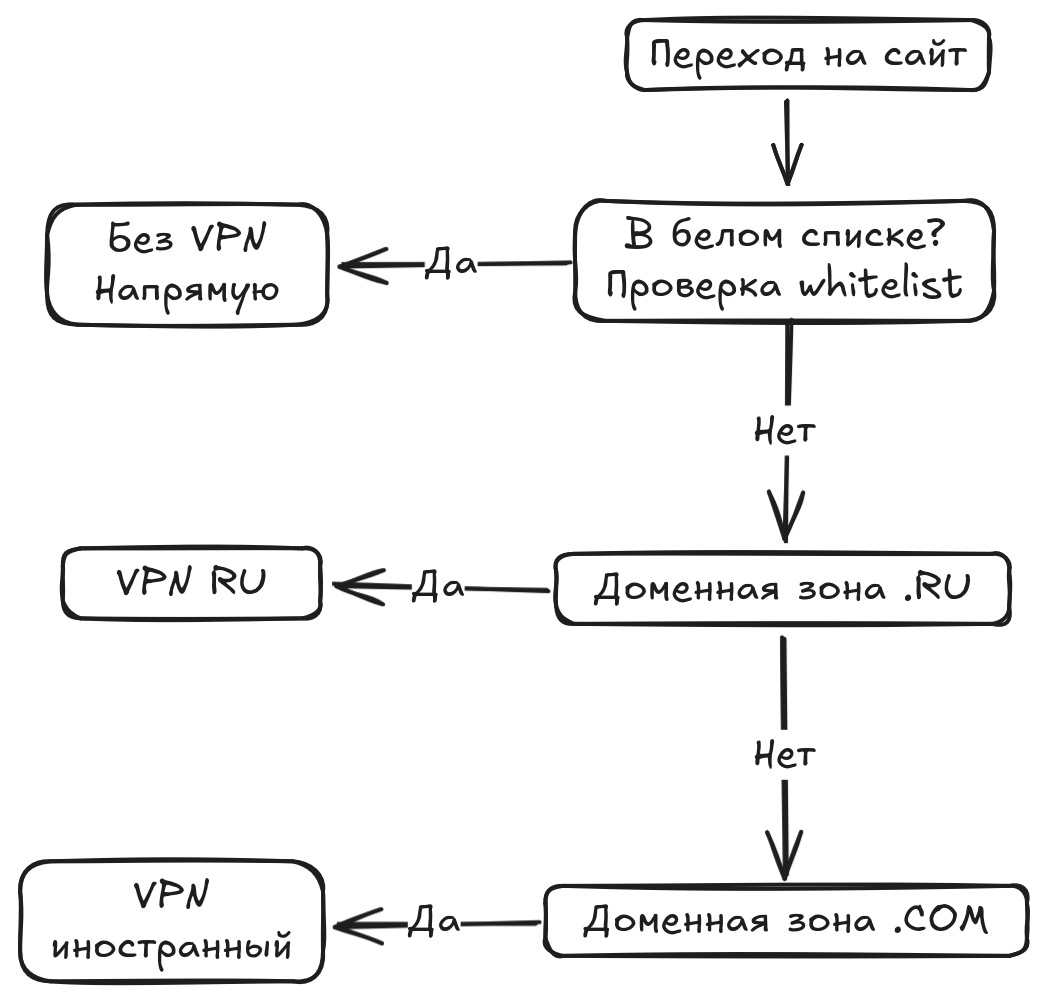
So the whitelist check happens in the client application. Address lists that need to be routed directly are loaded. We'd tried to add this functionality before, but due to the chaos with whitelists at times when mobile Internet was completely down, users ran into difficulties.
Core Stack
Remnawave & Remnanode & Subscription Page
To keep it brief, Remnawave is a panel for managing Xray-core infrastructure — a centralized orchestrator for Xray ecosystem protocols. The main idea is to avoid configuring each server manually through JSON configs, managing everything via a web panel and API instead.
The panel stores the user list, manages nodes, collects statistics, creates subscription links, generates and pushes configs to servers.
Remnanode is a separate container. It has Xray-core installed and runs the Remnawave agent, which receives configs from the panel.
Remnashop
Choosing the implementation for the Telegram bot took a long time. The projects I tested were either pure vibe-coding or overly complex structures. Fortunately, around that time the stable release of the Remnashop bot came out. At first glance, I knew — this is what we need.
The project is developing slowly, but so far I'm satisfied with the direction of development.
Monitoring
To quickly respond to incidents and test configurations, a monitoring system was added to the overall structure.
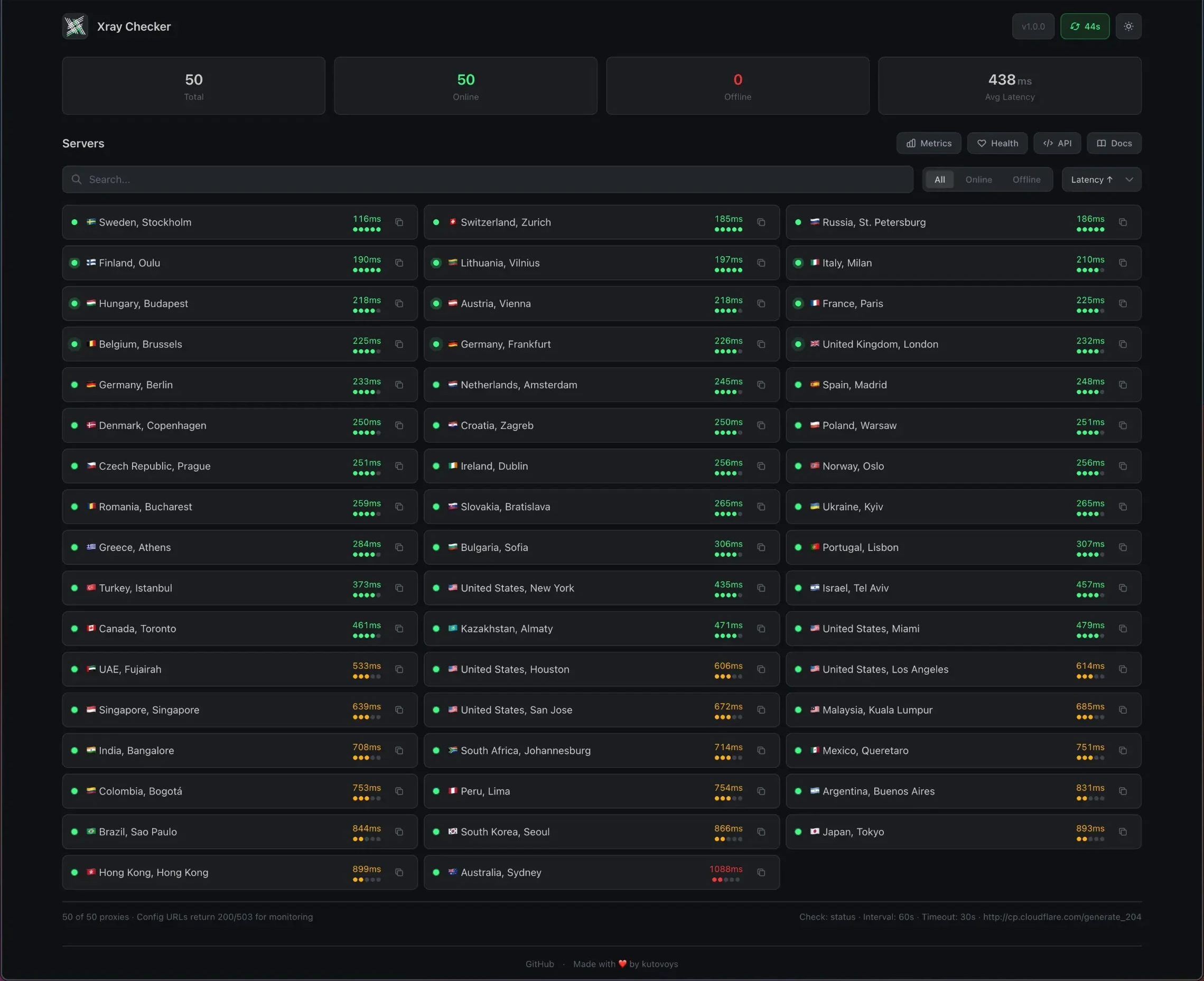
The first stage implemented the Xray-Checker + Uptime-kuma combo. The former checks VLESS connection availability and latency in milliseconds.
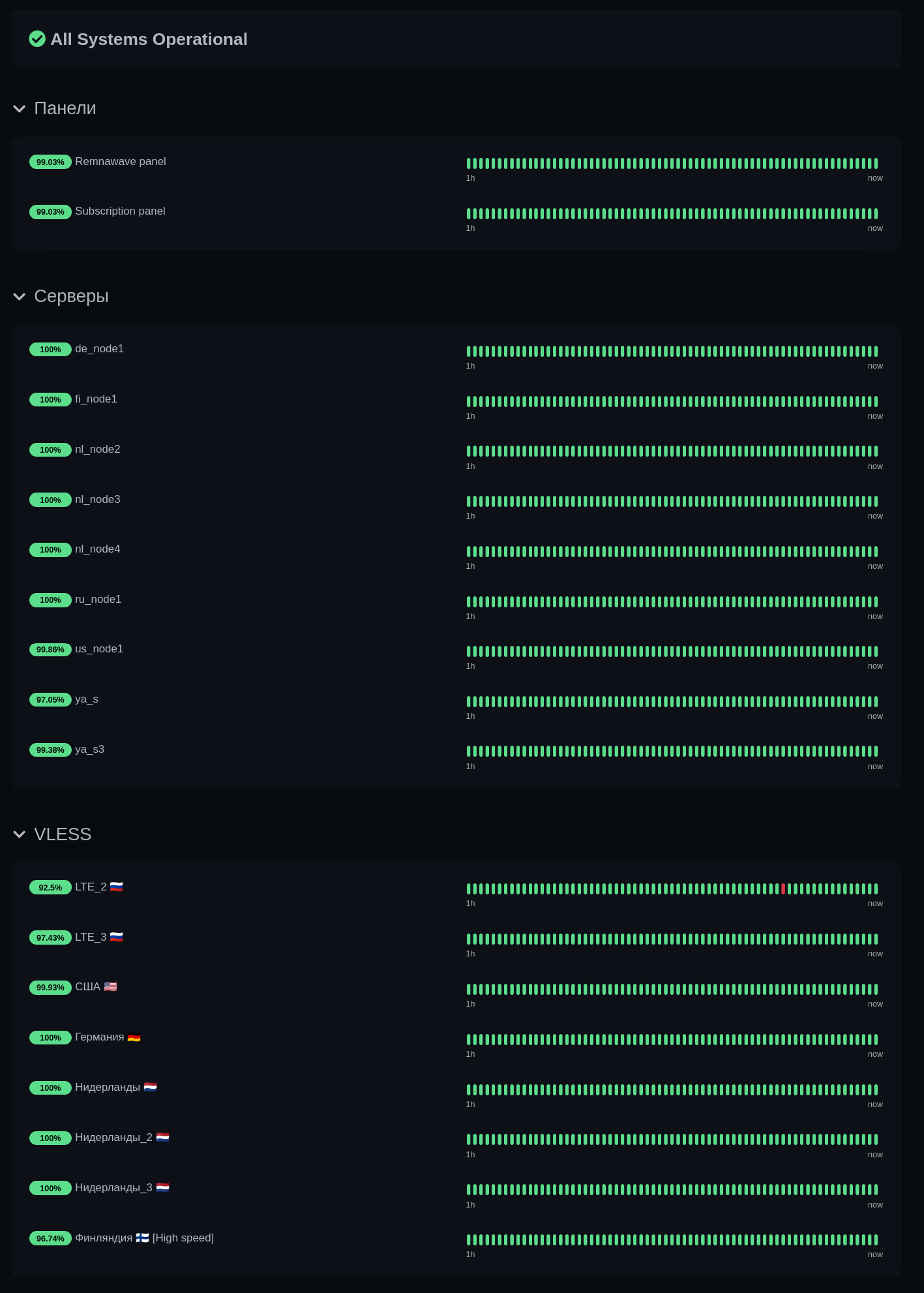
The latter displays connection stability, graphs, and notifies in case of outages. In addition to VLESS connections, server pings are also added to Uptime-kuma.
The next step was setting up the Grafana + Loki + Prometheus + Node Exporter stack. This is the classic infrastructure monitoring stack. Grafana handles the frontend and visualization. This stack was chosen for a simple reason — it's the standard, as if no other options exist. Although someone did suggest a lighter alternative.
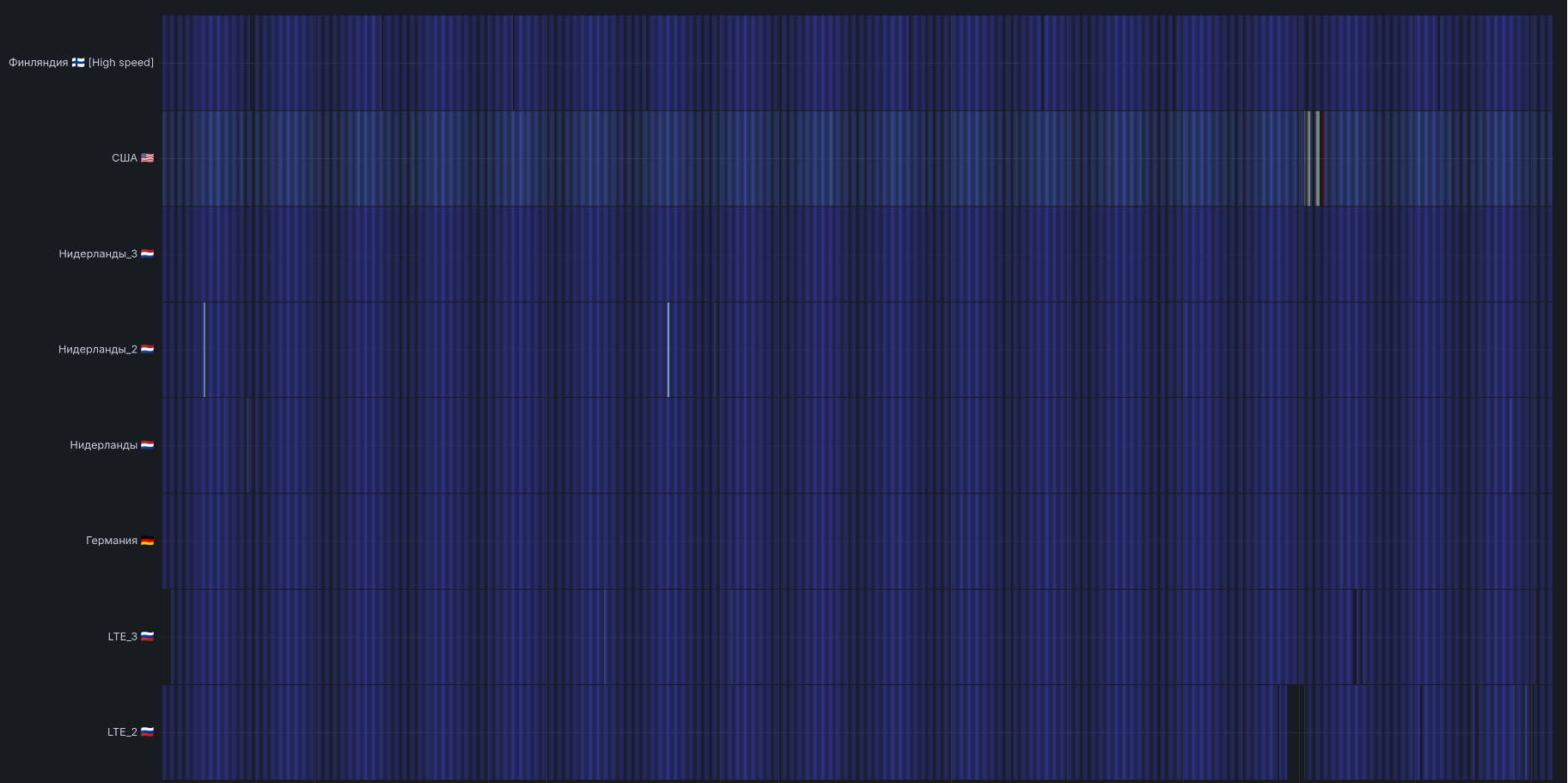
Loki collects logs from all machines via Promtail, Prometheus stores them and accepts metrics, while Node Exporter collects hardware metrics such as CPU, RAM, disk, network, etc.
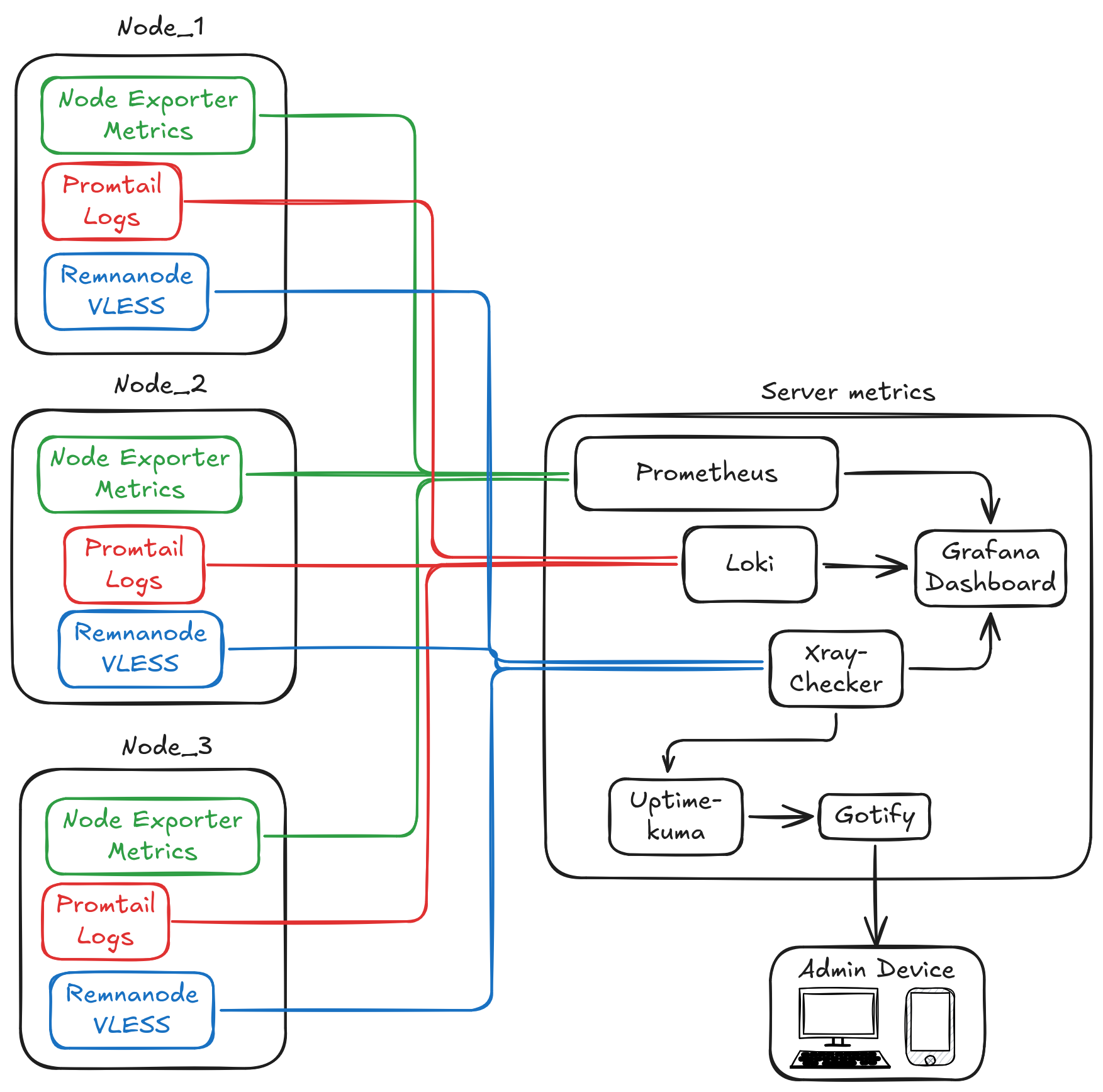
Failure notifications are handled by Gotify. Push notifications reach my smartphone and desktop. If something stops working, I'm the first to know within two minutes.
And here's another horror story. Initially, the service vacuumed up all logs — every single connection — with loglevel: "debug". Eventually, the bills for servers where traffic was metered skyrocketed. And my home server's SSD died. The logs weren't the cause, but they contributed. The nail in the coffin was torrents that had been continuously seeding content for 4–5 years. Seeding, of course, legal Linux distributions ;)
To wrap up this paragraph, I'd like to remind everyone about log file rotation. I use Logrotate.
Security
First and foremost, all ports were locked down with UFW. Access to open ports is restricted by IP. This is standard practice that is often neglected.
The next task was to shield the server from external scanning and restrict access to government networks. Clever folks have collected all the IP ranges of such networks on GitHub. All that remained was to block them.
In the block logs, I constantly see addresses from the Radio Frequency Center.

One of the most important security aspects is updates. All systems must be kept up to date. Classic approach — I use unattended-upgrades.
Then comes the boring stuff and routine practices: changing the SSH port to a non-standard one so scanner bots don't knock unnecessarily, optimizing sshd_config with these rules:
PubkeyAuthentication yes
PasswordAuthentication no
PermitEmptyPasswords no
PermitRootLogin prohibit-password
ClientAliveInterval 300
ClientAliveCountMax 2
LoginGraceTime 30
MaxAuthTries 3
MaxSessions 5
Setting up key-based access, configuring Fail2ban to prevent brute force attacks, auditd for investigating intrusion incidents, disabling ICMP pings.
Optimization
Next, I needed to address server orchestration. Initially, there were a substantial number of them — around 20. And after the first Remnanode updates, it became clear that automation was necessary. The solution was obvious — Ansible.
Ansible is a fantastic tool. But I wanted to bring something new to it. Just for that reason, I tried SemaphoreUI — a web interface for managing Ansible. I still use it today.
The next problem, which I admit caught me off guard, was bandwidth allocation across several hundred users.

The solution, however, came quickly — EDT + eBPF + BBR. It was interesting to observe them in practice. I won't pretend to be a genius — I don't fully understand all the nuances myself. But in short: we identify the Xray port, attach an eBPF shaper to it, and each IP address gets its own limit. EDT takes the packet, checks the user's limit, and based on BBR's pacing rate, assigns an exact time for when that packet can leave for the network — this way BBR doesn't have to wait for packet loss; it dynamically adjusts speed to match actual bandwidth. The result is smooth traffic flow without bursts, ideal for streaming. If a client sends packets faster than the limit, they get dropped, TCP detects the loss, and the speed decreases.
Whitelists
The most painful topic. How to restore mobile Internet. In October 2025, the first LTE network restrictions appeared. They were bypassed very simply: you just had to use the SNI (Server Name Indication) of a whitelisted site. The DPI system extracts the SNI, and if it doesn't match the whitelist — it drops the connection or spoofs the response. VLESS Reality can imitate a TLS handshake of the target domain so convincingly that the fingerprint matches.
In December, this trick stopped working. The hunt began for IP addresses that are on the whitelist. I suspect the authorities originally intended them only for corporate clients and businesses. But the infrastructure business wasn't ready for these changes, and regular individual users could obtain these addresses. The most obvious hunting ground became the cloud provider that let's call Yashka. The first hurdle was the platform's limits: one user could only rent two IP addresses. I wrote to Yashka's support asking to increase the limits under the pretense that I was a student and needed infrastructure for my studies.
After the limits were expanded, I needed to figure out which addresses to acquire. I tried pinging address ranges through the LTE network using a custom script. Fortunately, the KDE Plasma environment can accept an Internet connection via Bluetooth from a smartphone. But to my surprise, it turned out that the DPI triggers on mass pings and cuts the connection. I decided not to overcomplicate things and turned to existing lists that enthusiasts had published on GitHub.
After a couple of hours of trying addresses in Yashka, I got three addresses. Two were active, the third was a spare. The most valuable one was the 51.250.x.x range, as it was considered universal for all carriers and regions. At the time, I didn't realize how lucky I was, since the other two addresses were 84.201.x.x: after the previous range was removed from the whitelist, that one became universal, but not for long.
The downside of Yashka is that they charge for traffic — 1.6 rubles per GB. That's extra overhead. The solution was preemptible server configurations. The idea is that once a day, the servers shut down and need to be started manually. But the rental cost of such servers is half as much. Since we all love automation here, this wasn't a problem and was solved with a simple script. Now, downtime doesn't exceed three minutes per day.
Now, in May, this method has stopped working, as cloud providers have fixed their mistakes and are removing address ranges from circulation among individual users.
Risks and Outlook
Initially, the DPI/ТСПУ systems steered clear of domestic infrastructure. It's understandable why: infrastructure businesses need to make money. If their servers got shaped, nothing good would come of it. Now it's different. Your server can be blocked at any moment, and the cloud provider can't do anything about it. I checked — support simply replies: "Your server has been blocked by DPI systems, we can't help you and won't refund your money." Even legitimate servers get caught in the blocks. So we're currently reducing the share of servers with Russian cloud providers.
The allocation of whitelisted IPs is also tightening. Now they need to be registered to a sole proprietorship, with paid access and traffic — and even that guarantees nothing. Your provider can block you, the address can fall off the whitelist, or the DPI system can easily trigger on you.
Appetites are growing. If during the first wave of restrictions Yashka made the most money, in my estimation, now everyone wants a piece — every cloud provider is trying to grab a larger whitelisted address range and sell it to clients. This has all transformed into a big business for servicing the VPN gray zone. And I don't like it.
But this is far from the end. The screws will keep tightening — slowly, but in the right direction. The next step I see is blocking YooKassa accounts: it's currently the most popular service among VPN providers.
I liked Scammers' point from his latest video. The authorities can't technically block VPN yet, but they can make access difficult — some people have abandoned familiar services because they got tired of toggling VPN, others fear the VPN gray zone, and others simply don't want to pay for it. The next step will be banning the purchase of such services — advertising is already banned, and far fewer people will bother with crypto. And the number of VPN users will keep shrinking.
The one thought that keeps me warm: the introduced restrictions will nurture a young generation that will be technically savvy in matters of bypassing these restrictions and online privacy. For curious people, restrictions always sound like a challenge. Remember when we played computer games as kids, couldn't beat a level, and that drove us to figure out how it works inside. We learned to use ArtMoney, studied game configs and programming principles. We tried to bend the rules of the game.
Experiments
But our enthusiasm hasn't run out yet. I continue experimenting with transports, protocols, and masking. In the future, if the financial side bothers me less, I plan to add my own network of DNS servers with load balancing and ad tracker blocking. The project needs to be integrated with the web so clients can interact with the service without Telegram.
Some Statistics
- Currently, the service has 372 users, 132 of them active.
- 12 servers under management
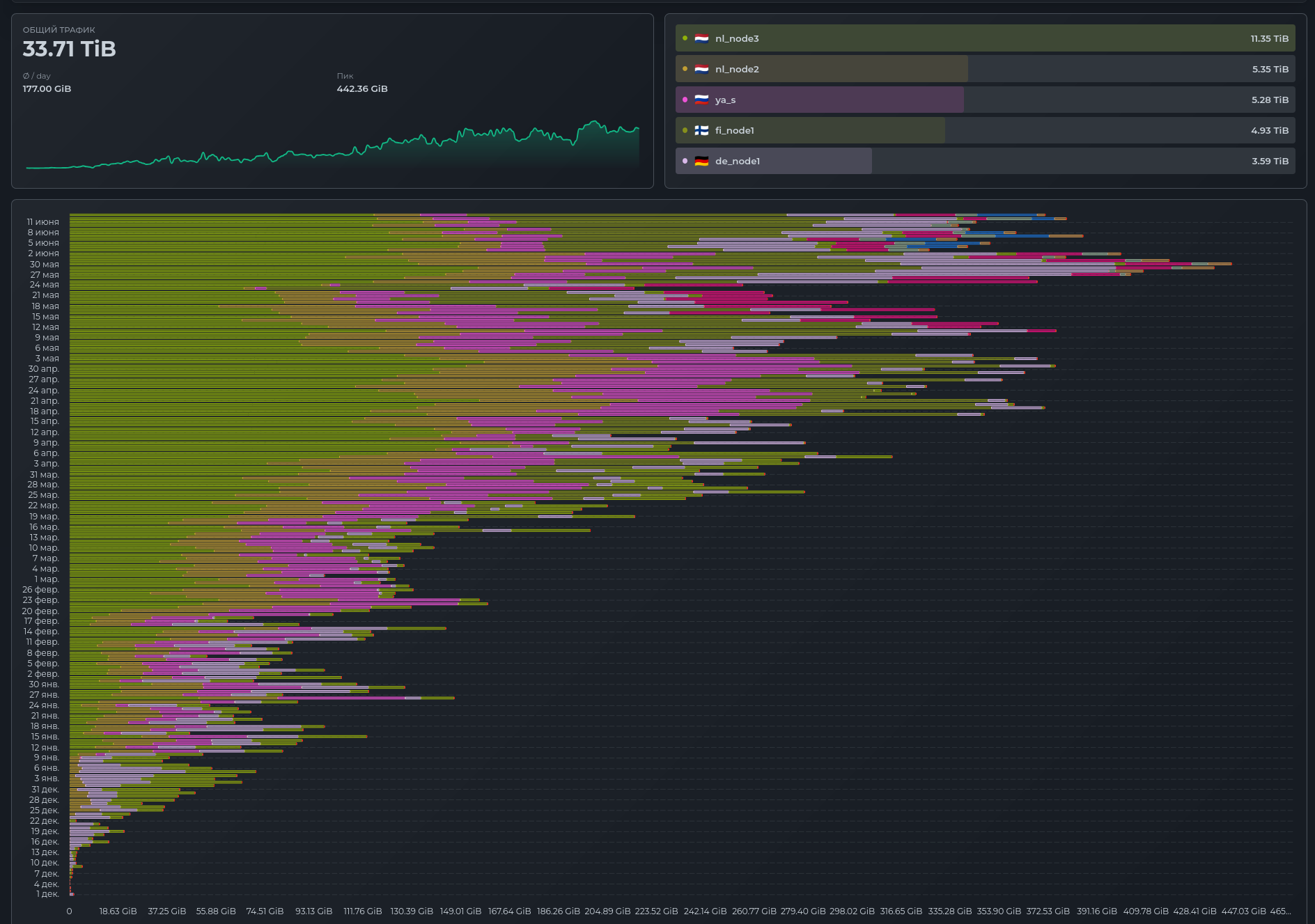
- 400 GB of traffic per day
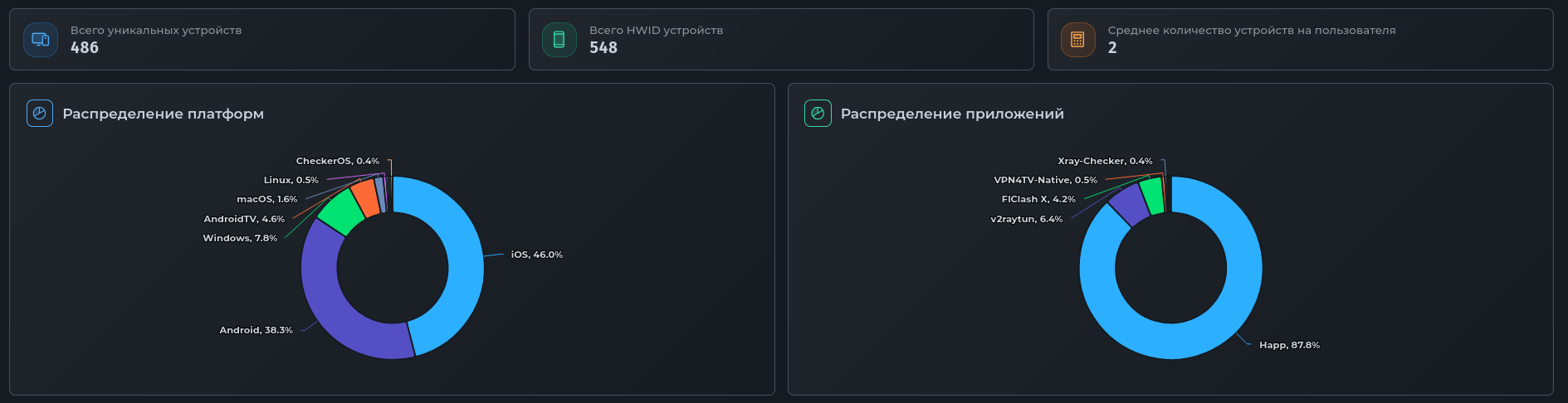
- Platform distribution: 46% iOS users, 38.3% Android
- App distribution: 87.8% Happ
- Total unique devices: 486
Conclusion
I'd like to end this article in my usual style. It's become something of a signature: Anyway, join us and welcome to the Internet!